Thread Rating:
  • 0 Vote(s) - 0 Average
  • 1
  • 2
  • 3
  • 4
  • 5
Opening Guide
#1
Information 
GENERAL

This Guide is in a total of 6 sections :
1.) General - You are here 
2.) Upstairs Hall
3.) Downstairs Hall
4.) H2H Room
5.) The Cage
There is a Closing Guide Here for at the end of the night . 

Title Updates :

To detail any required updates , boot the Main Stage setup outside of open hours . This has all supported titles installed . If any updates are showing , execute all updates here first , than one at a time on the rest of the cabs .

The procedure for connecting and updating per Host is outlined HERE <--

Cleaning :

This is done after every event , before the following Saturday . If not , ensure the following .

1.) Upstairs Hall Swept .
2.) Dust the screens on all Cabs .
3.) Germ Killer Sanitation Wipe all controls and door knobs .
4.) Downstairs Hall Swept .

Supply Storage : 

Behind the energy drink nobori in the Head to Head Room is where all the overstock of paper towels , plates , bowls , plastic cutlery and cups are located . The broom and dust pan and trash bags can also be found here . 


Enough cups , napkins , and paper towels should be placed out next to the water tank here .


Water Tank :

This tank is emptied after every night , and 30 minutes before opening should be rinsed in the shower with the detachable shower head . Then filled using the bath tub main tap . Ice Cubes can be found in the upstairs refrigerator in 2 flat trays . These should be added directly after the water is filled and the tank is placed back on it's shelf . This is optimal timing for cooling and keeps the water ice cold for the entire night .


Attached Files Thumbnail(s)
   
Reply
#2
Photo 
Upstairs Hall

First up is lighting . Three major types . Maintenance Lighting , Outdoor Lighting and Ambient Operational Lighting . 

Maintenance Lighting
- This is the white overhead light in the upstairs hall , in the ceiling . This should be turned on at the end of the night when the Ambient Operational Lighting is turned off , during closing hours .

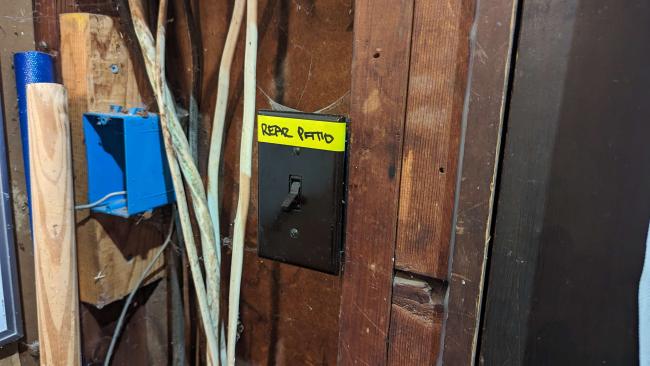
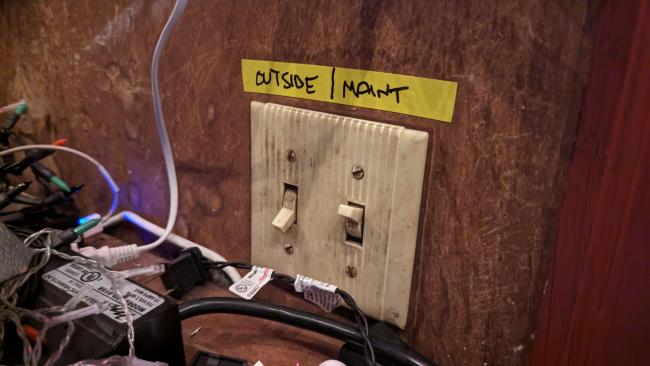
Outdoor Lighting- These are the two outdoor flood lamps that illuminate the walk along the side of the Upstairs Hall . These remain on until the last person is confirmed to have left and reached as far as the sidewalk . 

- This also covers the rear Patio Lighting . 


Ambient Operational Lighting
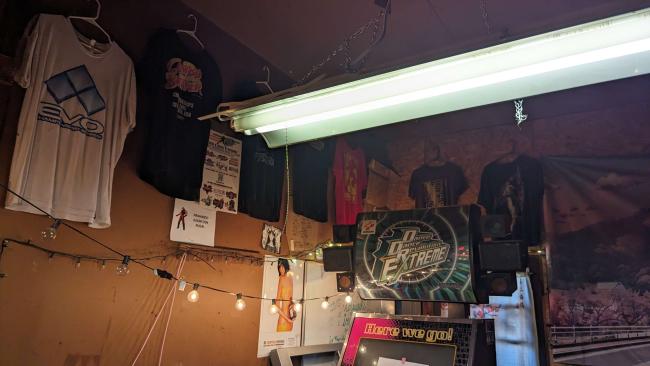
- This is powered by Power Strip A ( Detailed below )

- Use the pull chain for the fluorescent lighting
   

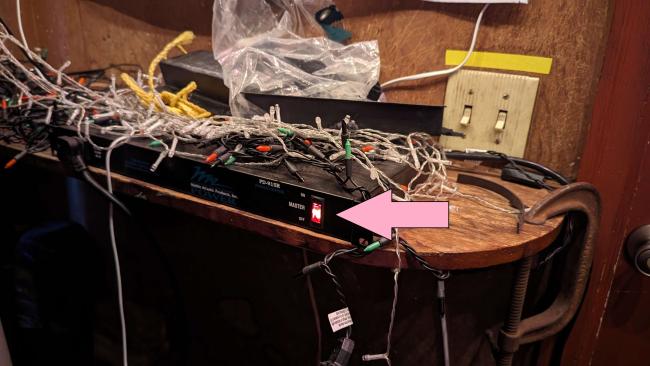
There are two Main Power Strips that will be required to power on .

Strip A
- Powers Ambient Operational Lighting , Hall Audio System and the Soul Calibur 2 Dedicated Cab
   

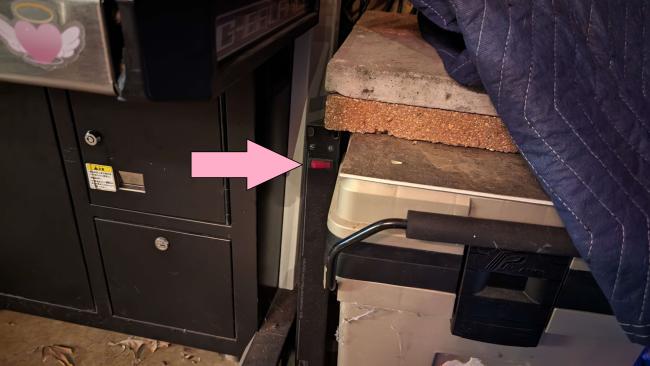
Strip B
- Powers the orange wall lighting and two cabs at the end ( When in JVS mode - None currently using this , still required )
   

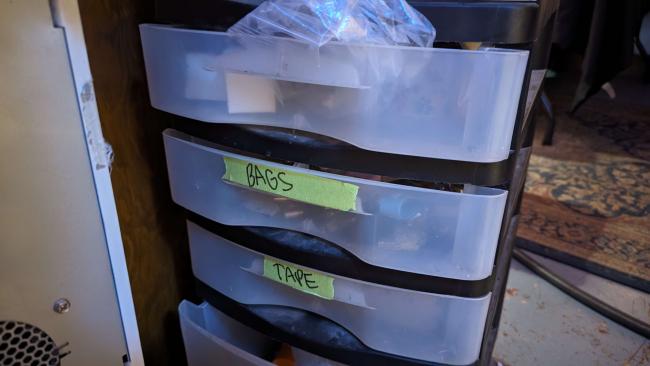
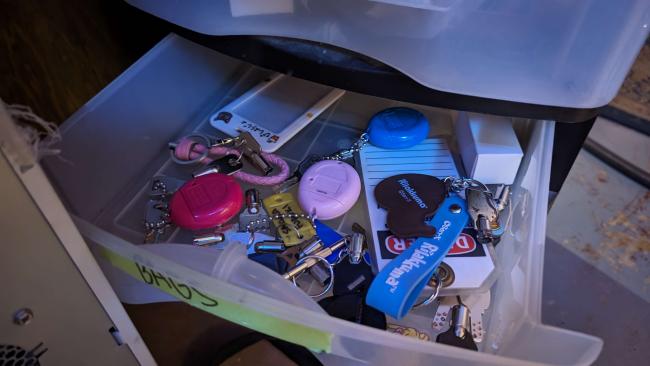
Determination on which machines to power is dependent on expected turnout , which also depends on many factors such as weather and time of the year . From right to left . Keys are found in the cage , at the entrance side in the drawer labeled as " Bags "


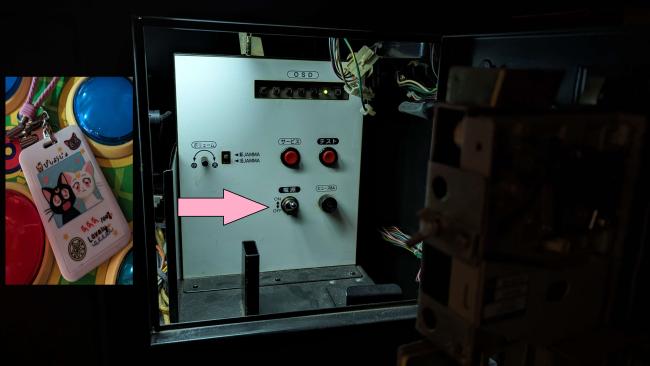
Pop'n Music Booting
- Open the top right access door with the key shown in the image and flip the top switch
   
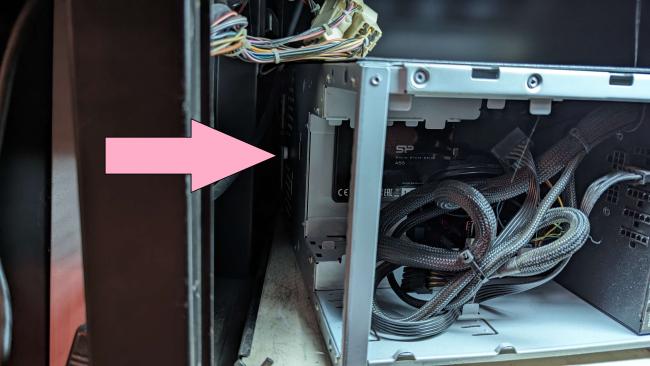
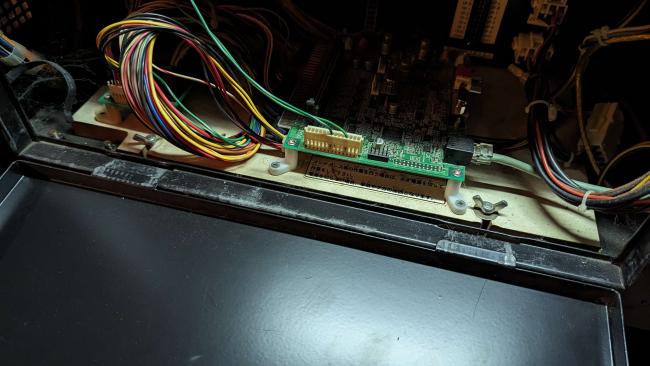
- Open the large access door , reach inside on the left and press the white 18mm Sanwa pushbutton ( This boots the Pop'n music computer ) . 
   
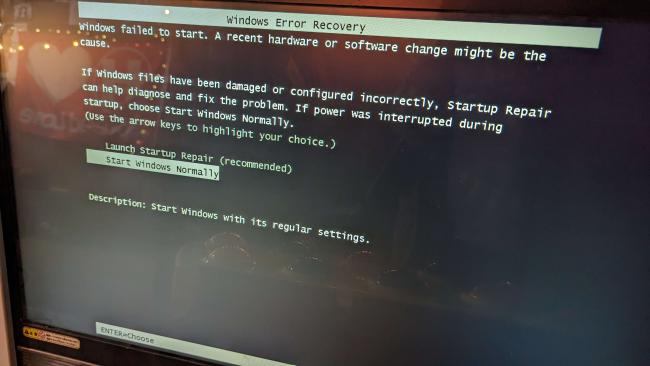
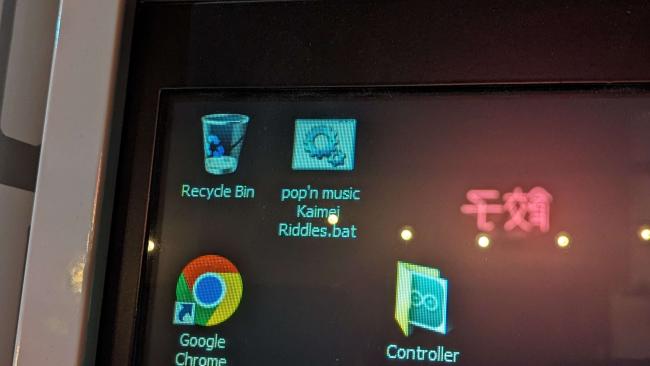
- When booting you will be met with the following screen . Select Start Windows Normally . 
   
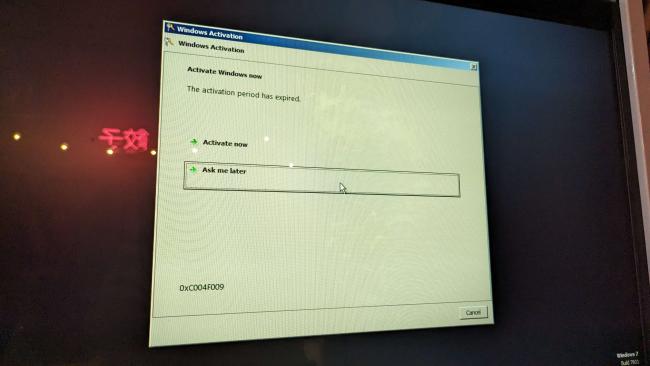
- Click ignore on the counterfeit Windows alert ( This is a legitimate licensed copy , XP is no longer supported , this will cause issues if verifying ) . 
   
- Wait to confirm that the network is showing as connected to " Wu-Tang Lan " ( Pop'n will NOT boot without this connected - Takes 5-10min )
- Double Click " pop'n music Kaimei Riddles.bat " on the desktop and the game will boot . 
   

Note : Take great care when setting this door panel back in place and closing . The metal tabs should drop in at a 45 degree angle and tip forward without any resistance . Any resistance , you are closing the panel incorrectly and can damage the locking tabs . 
   

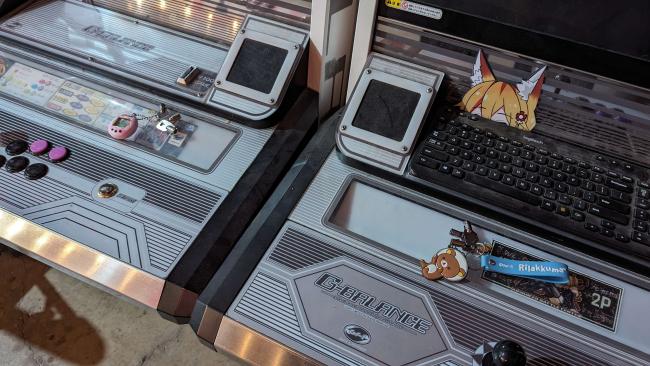
Linked G-BALANCE ( 720p Lower Spec Titles )
- Open the top right access door with the key shown in the image and flip the top switch on both cabs . They will automatically boot .
- Open Steam and select a title . 
   

Linked SQ/G-BALANCE ( 1080p High Spec Titles )
- Open the top right access door with the key shown in the image and flip the top switch on both cabs . They will automatically boot .
- Open Steam and select a title . 
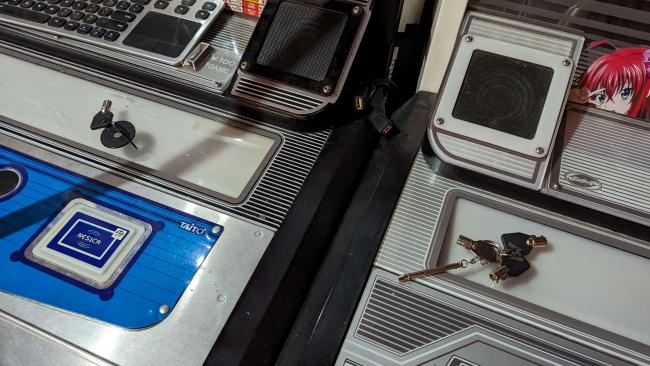
   

Linked Viewlix ( 1080p High Spec Titles )
The Blue Tamagotchi is for the blue branded machine , the Purple Tamagotchi is for the purple branded machine .
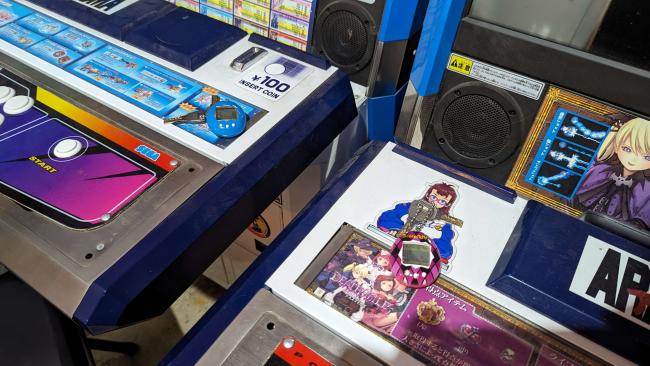
   
- Open the top right access door with the keys shown above and flip the red switch as shown , on both machines .
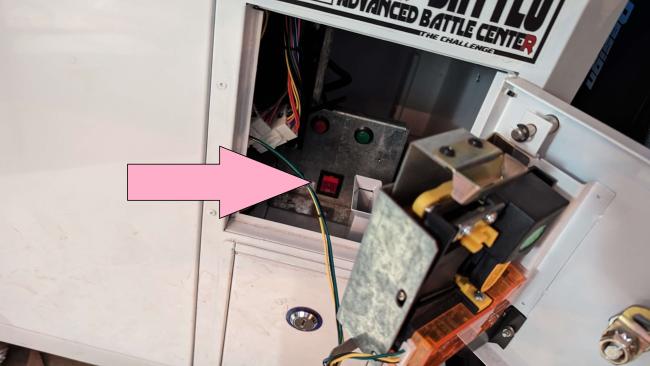
   
- Open the large left access door on the purple branded cab , flip the following switch ( gray push button tied to wiring harness ) .
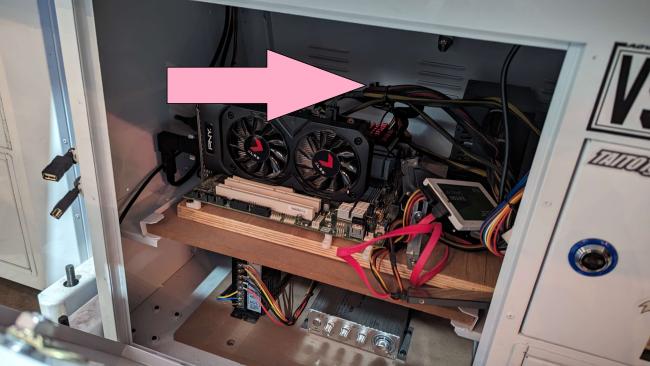
   
- Open Steam and select a title .

Reply
#3
Downstairs Hall

There are 3 Main Power Strips that will be required to power on .

Strip A
- Powers Lighting Section A ( Mahjong Pit , Christmas Lights ) 


Strip B
- Powers Lighting Section B ( The Table )
- Table Power Strip
- Big CRT
- Media LCD 
- PS2
- Fridge Genesis


Strip C
- Powers DDR/ITG*
- Setup Monitor Power Strip
- Surface Laptop
- Lava Lamp
- Fans


*The ITG computer automatically boots, along with audio and lighting. Only the monitor is required to be manually turned on. The power button is on the rear of the monitor here ,


The remotes for both the LCD on top of the " Big CRT " are both labeled . These should be placed on the coffee tables , 


The remote for the monitor at the couch setup is velcrowed to the rear of the monitor , 


To put on YouTube , press the power button on the surface here ,


Between the red couch and lazy boy , there are two last lighting strings that need plugged in ,


If HVAC ( Heating or AC ) is required downstairs , there is a magnetic white faced panel that closes up the duct . Removing this ( KEEP AWAY FROM CRTs ) allows for heating or AC ,


The dehumidifier currently sits forward off the wall of the cage on the carpet with two blocks of wood on top ,


Press the power button to shut this off , slowly push it against the Cage wall , and block the vents with the two blocks of wood ( to keep crumbs and other crap from falling inside ) ,


Finally it's time to boot the Main Stage Setup . To boot all the monitors and provide power to the Main Stage Computer , flip the button on the Main Stage Power Strip . All monitors will automatically power . 


Now you only need press the power button here on the Main Stage Computer , wait for it to boot , load Steam and boot a game .
Reply
#4
H2H Room

Start with Lighting and Ventilation if necessary . 

Turn the following switch 2-3 clicks until both blubs illuminate , 


Plug in the following lighting plugs into the outlets as shown . The Christmas lights plug in parallel on the top outlet, and the longer power block lighting in the bottom outlet . 


If ventilation is required , there is a fan here :


There is passive and active ventilation . In warmer weather if HVAC is not running , the window behind the fan can be opened . Otherwise , the fan can be operated during normal HVAC running hours by plugging in as the following out configuration . The fan will automatically power when plugged in .


Each Versatile City ( Head to Head Setup ) is powered by a single independent power strip . Flip each power switch and you will see a glowing orange indicator light .

Station A


Station B


Press the Power Button on Station A here :


Press the Power Button on Station B here :


The spectator monitors automatically power on . The CRTs will possibly power on automatically depending on the state they were in when the Main Power Strips were flipped off . You will briefly see NTSC Color Bars to indicate that the machines are booting . This may only show on the spectator monitors . 


The fans tilt and rotate per any direction the player may wish to use , they can also be positioned up and down .  The fans are controlled via a power button on the rear located on the rear .


Setup A player monitors MUST only be powered by use of the following remote :


It is tagged on the rear and face , and controls both sides . ONLY use the Power Button . Volume is handled independently and pre-set . Audio is not handled by the displays . These front buttons have faulty tact switches . The only thing not serviced on these chassis . 


The Verastile City B ( on the right hand side - closer to the door ) remote is pictured below . You may use BOTH the power button AND volume controls . 


To boot 3rd Strike , move to the taskbar with the mouse , select steam and move to the top and select 30th Anniversary Collection on both machines .


There is one mouse for both machines . It is plugged in normally on the Versatile City A Setup . ONLY plug in a keyboard or mouse into the following front ports . USB is specifically configured on the ports where players plug in controllers . Plugging a keyboard or mouse here will identify as a controller . 


Reply
#5
The Cage

1.) Turn on the overhead light here :


2.) Flip the following power switch to enable power in The Cage . This is a main cutoff . It's located under the shop bench


3.) Flip the following power switch to automatically start the Stream boot process .This process automatically powers audio , video output , game capture,  cameras and microphones . The broadcast computer will boot following a series of beeps . 


A program called NZXT will automatically boot and provides Realtime system feedback such as temps , RAM and CPU usage .

( Image Coming Soon )

Also note, the machine has an 80% chance of a PAGE_FAULT_IN_NONPAGED_AREA error . The machine will then reboot and function normally . 

( Image Coming Soon )

After this , OBS should automatically open , depending on how it was last shut down .

If you receive the following message , Windows shut down before OBS had completely shut down which can take up to 2-3 minutes after closing . Running in " Safe Mode " is not required . 

When OBS is booted , ensure that you can update game information by changing the game title .

( Image Coming Soon )

If this says " Stream Information Failed to Update " , please reboot OBS . If this persists , the stream will be required to re-connect manually to Twitch .

Please contact the acting manager of the Stream .
Reply
#6
Salty Bet Station

In the Mahjong Pit plug in the following power cable ,


This feeds a power strip for the old school computer desk at the other side , which also powers the Salty Bet Monitor , which will power automatically ,


Press the " Reset " button here on the " Shop PC " because it's wired to that instead of power at the moment . This is also known as the Salty Bet computer .


The monitor is at the far right of the Cage bench . A keyboard and mouse are in front of this monitor . At first boot BIOS will appear and ask what settings you prefer . Select " Power Saving " then " Save and Exit " . BIOS will state , " You have not made any changes " , just click accept and the machine will boot . 

Open Chrome on the desktop . Salty Bet should automatically open . If not , navigate to SaltyBet.com , unmute ( it's automatically muted ) and click the full screen icon . This display is mirrored with the viewing monitor in the Downstairs Hall .
Reply


Forum Jump:


Users browsing this thread: 1 Guest(s)