


Replacing the SCSI CD-ROM drive on the CPS-III with a MicroSD card seems to not be documented so well, so here is my take on it. This was done with the Darksoft Super BIOS. Listing the exact tools I had used to make this work.
This guide assumes you had been using a 3rd Strike CD, and the game has already been flashed to RAM. You are just changing from the CD-ROM to a CD-ROM Emulator.
CD-ROM image used is attached. It is a copy of the CD-ROM that was found in the drive when we got our first CPS-III. From the file name, it was determined to be a Darksoft Multi-CD image that has the Darksoft logo removed from the boot screen.
This version is specifically for the Darksoft BIOS, not a stock 3rd Strike Security Cart. The original thread on this can be found here: https://www.arcade-projects.com/threads/...leases.36/
If your SCSI2SD board looks like this,
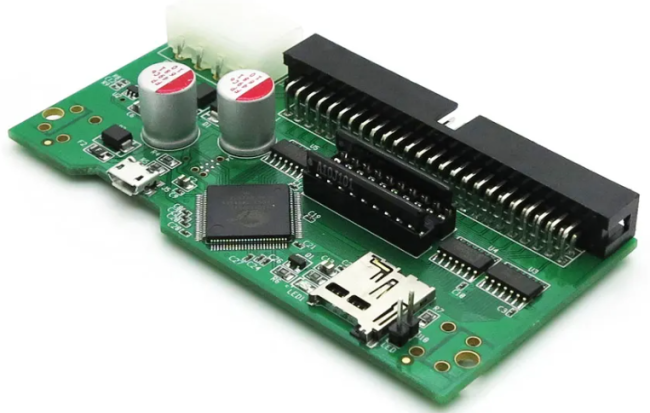
This guide is for you.
Requirements:
SCSI2SD
MicroSD Card (I used a 16GB)
ISO to flash to SD Card
SDCardFormatterV5
HDDRawCopy 1.20 Portable
Preparing the SD card:
1. Download SDCardFormatterV5 and run.
Select your MicroSD card. It should automatically select it if you only have one plugged in. Do not change any settings. Press 'Format'
 Screenshot 2024-03-12 152046.png (Size: 13.37 KB / Downloads: 10)
2. Download HDDRawCopy 1.20 Portable and run.
Double click 'FILE' under the BUS column and select the ISO.
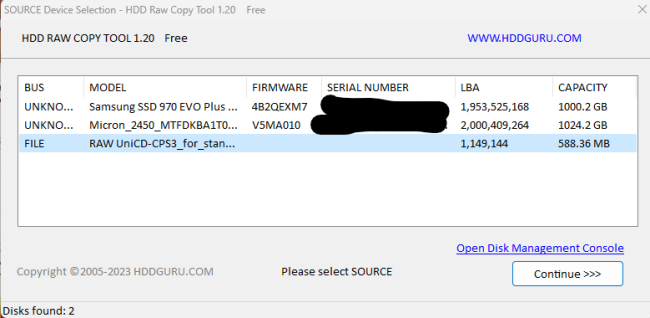
Click 'Continue' and now you will select the MicroSD card you have inserted.
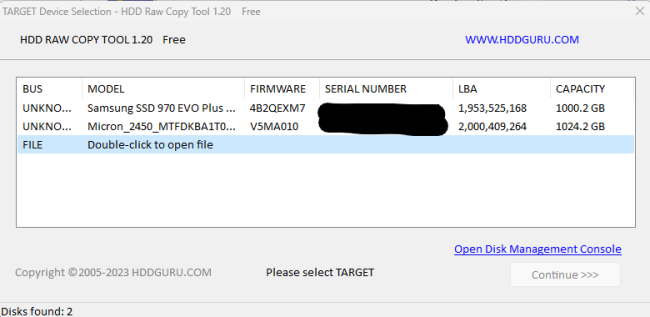
Once you hit 'Continue' again, you will have a screen showing your ISO and your SD card. Press 'START' and the copy will begin. Once complete, remove the SD card from your computer and insert to your SC2SCSI board.
Configuring SCSI2SD for CD-ROM:
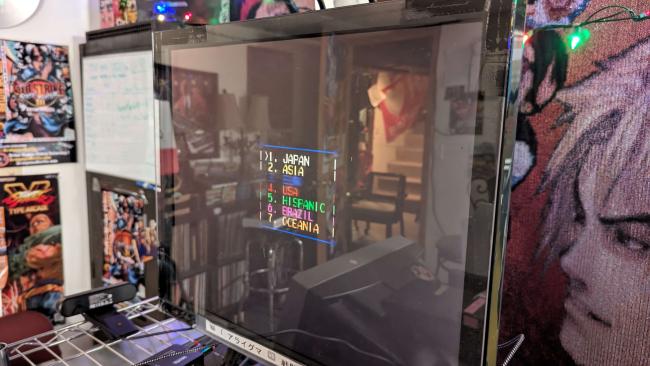
If you stopped at the above step, and plugged into your CPS-III, this is what you would see,
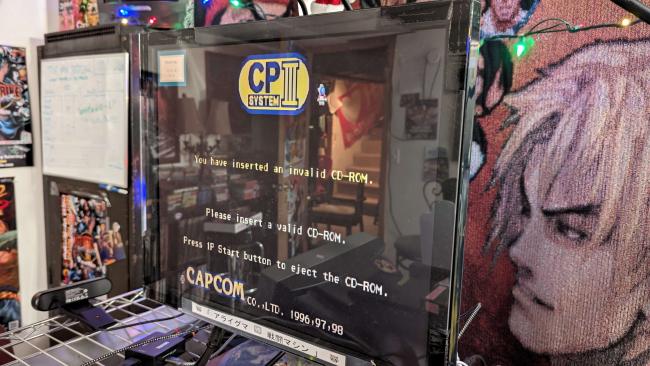
Which is interesting, because it's seeing a CD-ROM drive and seeing a CD-ROM, but reporting it as invalid. This happened because the SCSI emulator is set to HDD. To change this to CD-ROM, you will need "scsi2sd-util.exe" from the following location: http://www.codesrc.com/mediawiki/index.p...I2SD#Files
Downloads for v3/v4/v5.
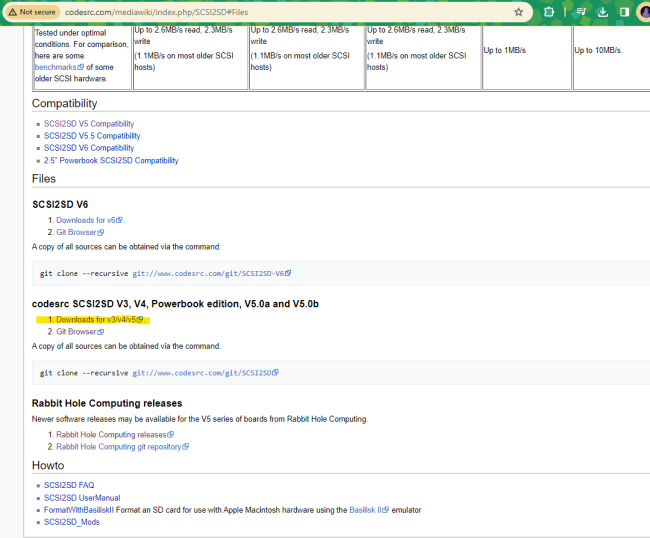
The file path at the time was: http://www.codesrc.com/files/scsi2sd/lat...ows/64bit/
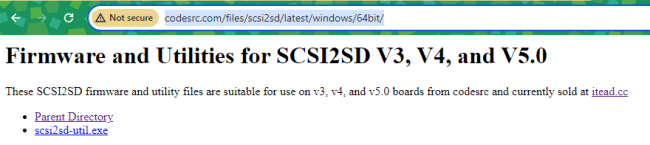
When opening up, I could see the version that I had. After determining the correct version, I was able to use the one shown.
Opening the application, select the 'Device 1' tab
image (20).png (Size: 20.86 KB / Downloads: 12)
Your device will be set at whatever the outfit that built the board up had it on last. Most likely Hard Drive as that's the most common use for these SCSI emulators. However with CPS-III, we need to emulate a CD-ROM device.
You will set 'Device Type' to 'CD-ROM'
Then set 'Device Size' to '700' and the prefix to 'MB'
Screenshot 2024-03-12 150402.png (Size: 18.98 KB / Downloads: 12)
The should match the above. Now, navigate to 'File' and select 'Save to Device'. The settings should then write to the SCSI2SD and say completed.
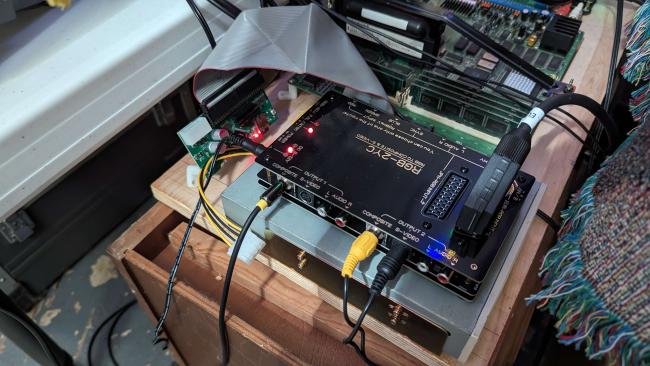
When connecting to the CPS-III, use the Ribbon Cable ONLY. You do not require the additional power from the JAMMA edge (on the 4 Pin connector).
Additional Troubleshooting:
Here was an interesting step that one may or may not have to do. I could not get the device to save settings. I kept getting an error.
I re-flashed the firmware from the following location,
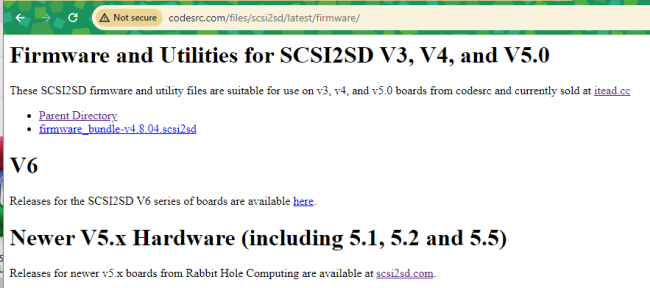
Running the 'scsi2sd-util' and navigating to File>Upgrade Firmware
Screenshot 2024-03-12 154808.png (Size: 12.44 KB / Downloads: 12)
I selected the downloaded firmware,
Screenshot 2024-03-12 155003.png (Size: 22.81 KB / Downloads: 12)
The device began to flash the firmware, the device disconnected, then over and over I heard the USB connect sound, then disconnect sound. The device seemed to have bricked.
Going back to File>Upgrade Firmware, and selecting 'firmware_bundle-v4.8.04.scsi2sd' again, it started the flashing process again, thus not being bricked. The process then showed as completed, and was recognized again.
Setting all my settings to 700MB CD-ROM, navigating to save, there was no longer an error and the parameters had saved.
Everything worked after this. I did not record version numbers but it did in fact update my firmware to 4.4, which I believe previously was 4.1.
Thought this might be useful to include for anyone who got caught on this too.
This guide assumes you had been using a 3rd Strike CD, and the game has already been flashed to RAM. You are just changing from the CD-ROM to a CD-ROM Emulator.
CD-ROM image used is attached. It is a copy of the CD-ROM that was found in the drive when we got our first CPS-III. From the file name, it was determined to be a Darksoft Multi-CD image that has the Darksoft logo removed from the boot screen.
This version is specifically for the Darksoft BIOS, not a stock 3rd Strike Security Cart. The original thread on this can be found here: https://www.arcade-projects.com/threads/...leases.36/
If your SCSI2SD board looks like this,
This guide is for you.
Requirements:
SCSI2SD
MicroSD Card (I used a 16GB)
ISO to flash to SD Card
SDCardFormatterV5
HDDRawCopy 1.20 Portable
Preparing the SD card:
1. Download SDCardFormatterV5 and run.
Select your MicroSD card. It should automatically select it if you only have one plugged in. Do not change any settings. Press 'Format'
Screenshot 2024-03-12 152046.png (Size: 13.37 KB / Downloads: 10)
2. Download HDDRawCopy 1.20 Portable and run.
Double click 'FILE' under the BUS column and select the ISO.
Click 'Continue' and now you will select the MicroSD card you have inserted.
Once you hit 'Continue' again, you will have a screen showing your ISO and your SD card. Press 'START' and the copy will begin. Once complete, remove the SD card from your computer and insert to your SC2SCSI board.
Configuring SCSI2SD for CD-ROM:
If you stopped at the above step, and plugged into your CPS-III, this is what you would see,
Which is interesting, because it's seeing a CD-ROM drive and seeing a CD-ROM, but reporting it as invalid. This happened because the SCSI emulator is set to HDD. To change this to CD-ROM, you will need "scsi2sd-util.exe" from the following location: http://www.codesrc.com/mediawiki/index.p...I2SD#Files
Downloads for v3/v4/v5.
The file path at the time was: http://www.codesrc.com/files/scsi2sd/lat...ows/64bit/
When opening up, I could see the version that I had. After determining the correct version, I was able to use the one shown.
Opening the application, select the 'Device 1' tab
image (20).png (Size: 20.86 KB / Downloads: 12)
Your device will be set at whatever the outfit that built the board up had it on last. Most likely Hard Drive as that's the most common use for these SCSI emulators. However with CPS-III, we need to emulate a CD-ROM device.
You will set 'Device Type' to 'CD-ROM'
Then set 'Device Size' to '700' and the prefix to 'MB'
Screenshot 2024-03-12 150402.png (Size: 18.98 KB / Downloads: 12)
The should match the above. Now, navigate to 'File' and select 'Save to Device'. The settings should then write to the SCSI2SD and say completed.
When connecting to the CPS-III, use the Ribbon Cable ONLY. You do not require the additional power from the JAMMA edge (on the 4 Pin connector).
Additional Troubleshooting:
Here was an interesting step that one may or may not have to do. I could not get the device to save settings. I kept getting an error.
I re-flashed the firmware from the following location,
Running the 'scsi2sd-util' and navigating to File>Upgrade Firmware
Screenshot 2024-03-12 154808.png (Size: 12.44 KB / Downloads: 12)
I selected the downloaded firmware,
Screenshot 2024-03-12 155003.png (Size: 22.81 KB / Downloads: 12)
The device began to flash the firmware, the device disconnected, then over and over I heard the USB connect sound, then disconnect sound. The device seemed to have bricked.
Going back to File>Upgrade Firmware, and selecting 'firmware_bundle-v4.8.04.scsi2sd' again, it started the flashing process again, thus not being bricked. The process then showed as completed, and was recognized again.
Setting all my settings to 700MB CD-ROM, navigating to save, there was no longer an error and the parameters had saved.
Everything worked after this. I did not record version numbers but it did in fact update my firmware to 4.4, which I believe previously was 4.1.
Thought this might be useful to include for anyone who got caught on this too.
[ Heavens Third-Rate Tomboi  NeSiCaXZXxxLiveCamz ]
NeSiCaXZXxxLiveCamz ]